On a recent client app, I ran into a situation where I needed an arbitrary number of EditText fields based on a selected value, where the user could enter people’s information. My initial thought was to put this logic in my Fragment, just adding EditTexts to a LinearLayout container as the selected value changes, but that bloated my Fragment, and didn’t allow for much reuse.
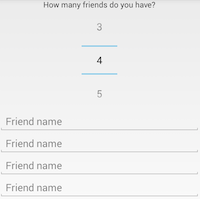 This was a perfect opportunity to encapsulate this interaction functionality in a custom view, which would be reusable throughout the app (required in two places so far), and would allow me to easily test the encapsulated functionality. # What Are Custom Compound Views The Android framework provides many Views and Layouts, but sometimes developers need to create their own. Sometimes these are extensions of the built in class to add functionality, like supporting custom fonts and letter spacing in TextViews. Other times these are simply because a built in view doesn’t exist for the desired functionality, like radial dials. What I’m talking about are custom compound views, views that are made up of multiple other views, whether those are builtin or custom, to encapsulate complex interaction and functionality. I use compound views in cases where a full fledged Fragment is more than I need, but I want reusable, testable components. The example I explained above is a great example of that. Since the code for that was for a client project, I’ve created a simple project to demonstrate creating and using custom compound views available [here](https://github.com/rharter/CompoundViews). # The Custom View In this example, we want a custom view that adds EditTexts so that the user can enter data for an arbitrary number of items. In a custom view, this can easily be done with a simple container view (LinearLayout) that sets the appropriate number of EditTexts, and allows you to easily fetch a list of names. Here’s the code: <div class="highlight" style="font-weight: inherit; font-style: inherit;"> <table style="font-weight: inherit; font-style: inherit;"> <tr style="font-weight: inherit; font-style: inherit;"> <td class="gutter" style="font-style: inherit;"> ``` 1 2 3 4 5 6 7 8 9 10 11 12 13 14 15 16 17 18 19 20 21 22 23 24 25 26 27 28 29 30 31 32 33 34 35 36 37 38 39 40 41 42 43 44 45 46 47 48 49 50 51 52 53 54 55 56 57 58 59 60 61 62 63 64 65 66 67 68 69 70 71 72 73
...